Vemus WordPress Theme is Live Special $19 Offer for You! BUY NOW
Hire Us
  • 1. Welcome
  • 2. Before You Begin
  • 3. Install Requirements
  • 4. Import the Kit
  • 5. Create Pages
  • 6. Forms, Slides & Tabs
  • 7. Header, Footer & Homepage
  • 8. Support & Credits

Vithemes · Elementor Template Kits

Welcome to the Template Kit Documentation

One guide for every Elementor Template Kit: what you need, how to install the required plugins, import the kit, build pages from the templates and set up your header, footer and homepage.

Elementor Template Kit Documentation

  • Applies to: all Elementor Template Kits sold on Vithemes
  • Technology: WordPress, Elementor (Flexbox Container), Hello Elementor, Template Kit Import plugin
  • Some kits also need Elementor Pro, see the item description
  • Author: Themesflat

Thank you for choosing our Template Kit! A Template Kit is a set of ready-made Elementor pages and sections, not a theme. You install it on a WordPress site that already runs Elementor, then insert the templates into your own pages and replace the demo text and images with yours. This guide is the same for every kit.

i
Tip

Always check the item page of your kit for its own requirements (Elementor Pro, extra plugins, fonts) and its page list.

Quick Start:

What you get with a Template Kit:

  • Full-page templates (home, about, services, contact and more) built with Elementor
  • Global Kit Styles with the colors and fonts of the demo
  • Reusable blocks such as forms, tabs, slides and loop items
  • Header, footer and other site parts for Elementor Pro kits
  1. Install Hello Elementor, Elementor and Template Kit Import (see Install Requirements).
  2. Upload the kit zip in Tools → Template Kit (do not unzip it).
  3. Click Install Requirements if asked, import Global Kit Styles, then import the templates.
  4. Create a page, click Edit with Elementor, open the Envato icon and insert a template.
  5. Set Page Layout to Elementor Full Width and publish.

Before You Begin

Is your item an Elementor Template Kit?

Only items listed under Elementor → Template Kits with “Elementor Template Kit” in the title and file name work with the method in this guide. The Template Kit Import plugin cannot install WordPress themes, HTML templates, site templates or UI/UX templates.

i
Tip

Got a zip or upload error already? Check that the file is the kit zip and not a theme or another package. See Template Kit zip and file format errors for detailed compatibility checks.

What you need

  • A WordPress site (a fresh install or a staging copy is best)
  • The Hello Elementor theme
  • The free Elementor page builder plugin
  • The Template Kit Import plugin (by Envato)
  • Elementor Pro, only if the item description says the kit requires it
  • Your kit file, not unzipped
i
Note

No Envato subscription is needed to use a kit you bought. Always read the plugin requirements in the item description before you start: some kits also need extra plugins such as Elementor Pro or a form plugin.

Install Requirements

Do these steps once on your site, before you import the kit.

Step by step

  1. Download your kit and do not unzip it. If your download is a bigger package that contains the documentation and the kit, unzip that package once and keep the inner kit zip file as it is. Safari users: turn off “Open safe files after downloading” in Preferences first, or Safari will unzip the file for you.
  2. Go to Settings → Permalinks, select Post name and click Save Changes.
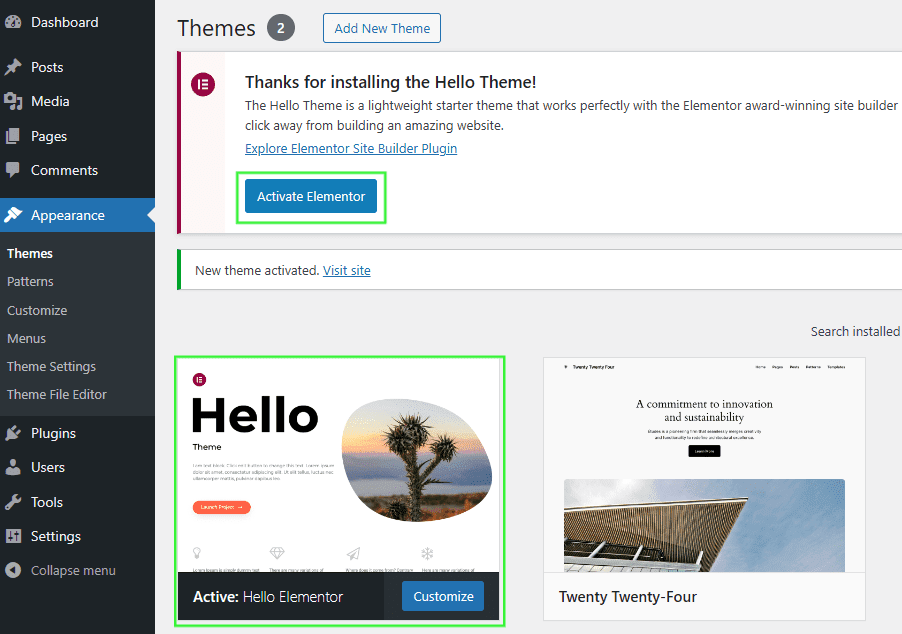
  3. Go to Appearance → Themes → Add New, then install and activate Hello Elementor. When asked, click Install and then Activate for the Elementor plugin. Close the Elementor sign-up page if it appears.
    Install and activate the Elementor plugin
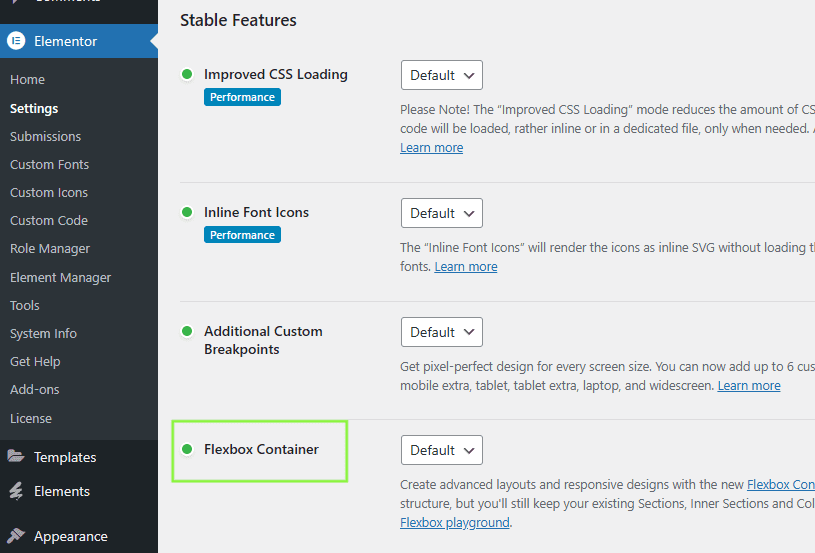
  4. Go to Elementor → Settings → Features and make sure Flexbox Container is Active. This is required for every kit published after October 1, 2023.
    Flexbox Container set to Active
  5. Go to Elementor → System Info and check that your server meets the minimum requirements of Elementor (PHP version, memory limit and so on).
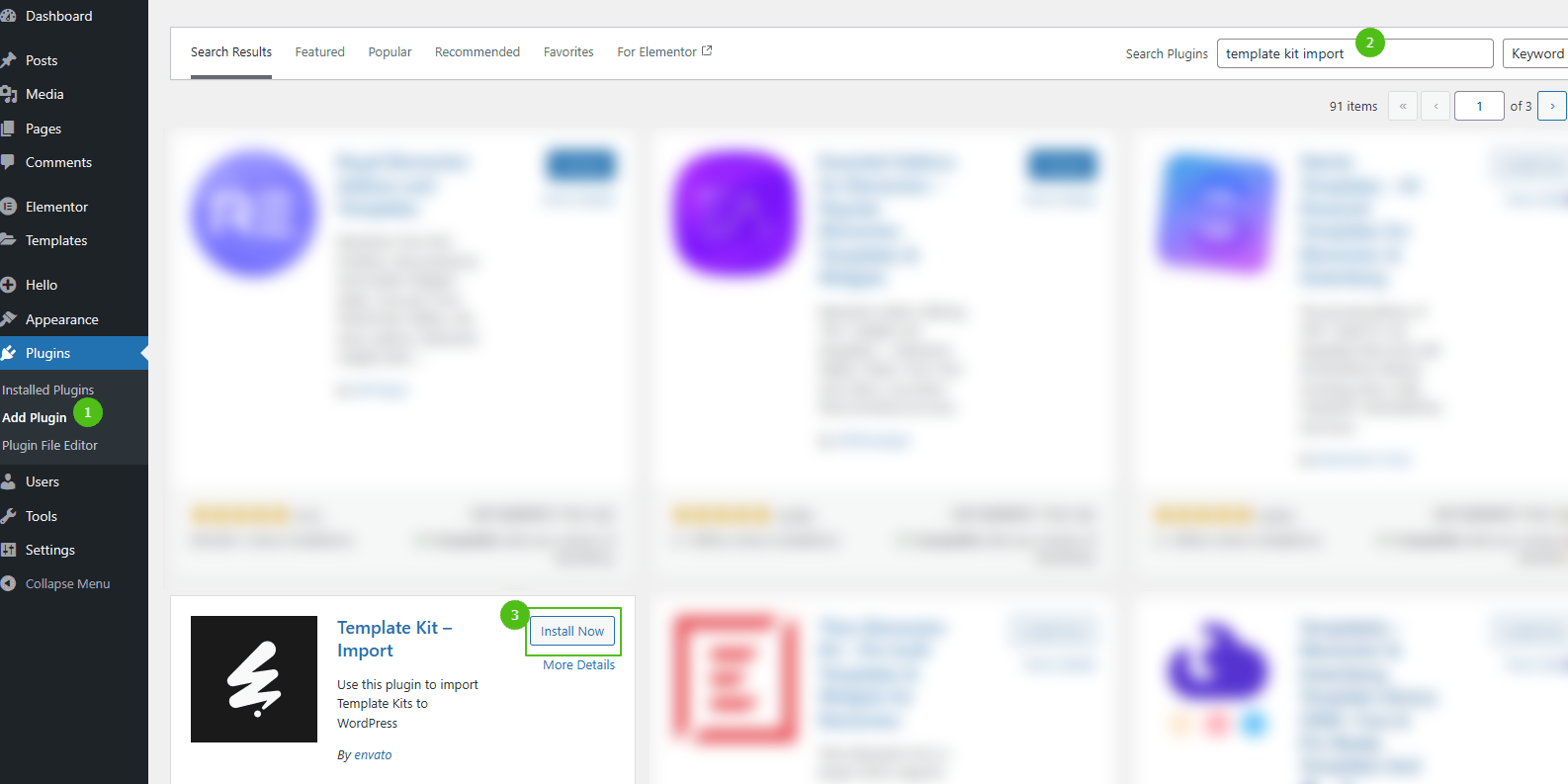
  6. Go to Plugins → Add New, search for Envato, then install and activate the Template Kit Import plugin.
    Install the Template Kit Import plugin
  7. If the kit requires Elementor Pro, install it and connect your license before you continue.
Import the Kit

Upload the kit zip

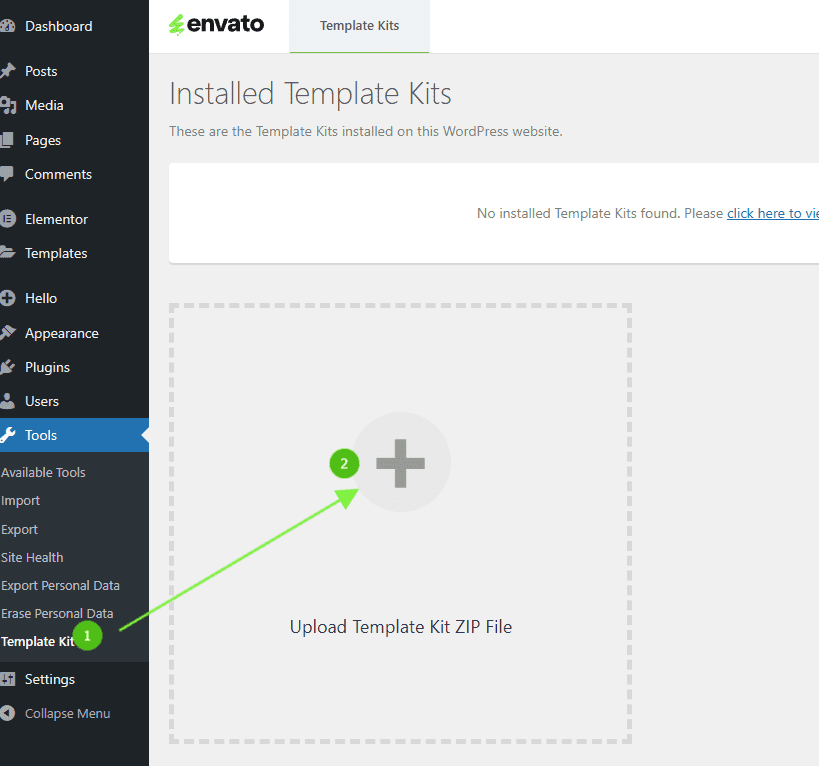
  1. Go to Tools → Template Kit and click Upload Template Kit ZIP File. Choose the kit zip you downloaded.
    Upload Template Kit ZIP File
  2. If an orange banner appears, click Install Requirements. This loads the addons and settings the kit needs.
    Install Requirements banner
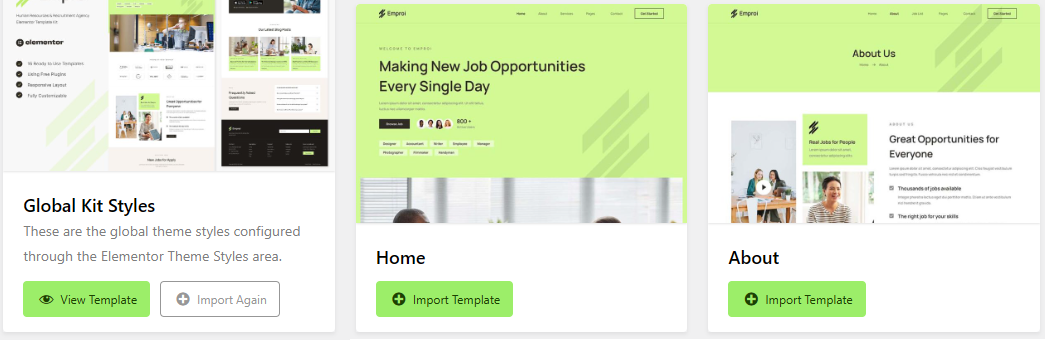
  3. Click Import on Global Kit Styles first. It sets the colors, fonts and site settings of the kit.
  4. Then click Import Template on each template you want, one by one.
    Import Global Kit Styles and templates
i
Note

Import Global Kit Styles before the other templates, otherwise colors and fonts will not match the demo.

Where the imported items are stored

  • Templates (pages and sections) are in Templates → Saved Templates. Insert them into a new page before you customize them.
  • Blocks, tabs and slides are also in Templates → Saved Templates. Duplicate them and customize directly.
  • Elementor Pro site parts (header, footer and so on) are in Templates → Theme Builder. Customize them directly.

Common import problems

  • “Invalid zip” or “PHP Zip extension” error: see Template Kit zip and file format errors.
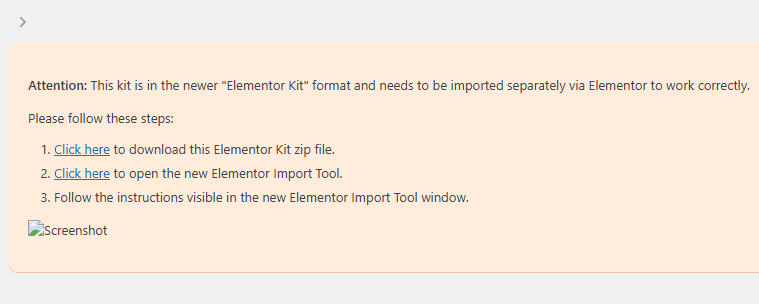
  • “This kit is in the newer Elementor Kit format”: the item is an Elementor Full Site Kit. It is made for a fresh WordPress install and does not use the Template Kit Import plugin (the title or file name says “Full Site Kit”, and it needs Elementor Pro). Do not download it again. Go to Elementor → Tools → Import and import your original file there.
    Message for the newer Elementor Kit format
  • Import error while importing templates: this is usually a hosting setting (upload size, execution time or memory). See Template Kit import troubleshooting, or ask your host to raise the limits.
Create Pages

Build a page from a kit template

  1. Go to Pages → Add New Page, enter a title and click Edit with Elementor. Close any Elementor popup that appears.
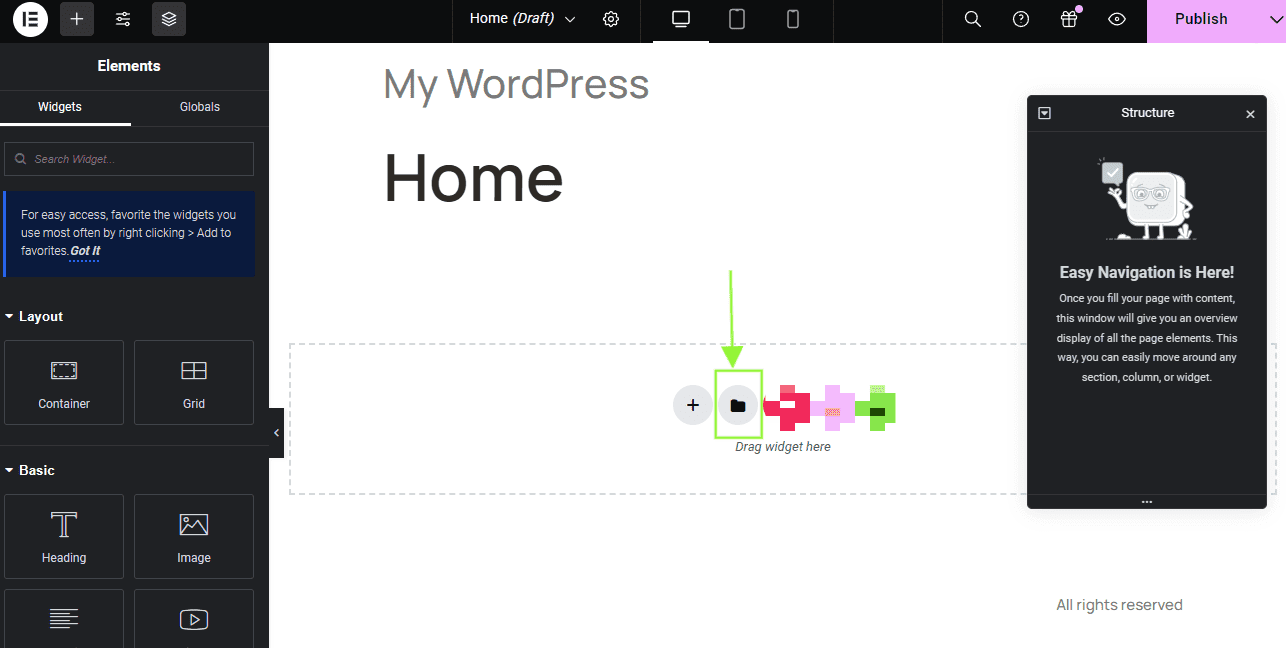
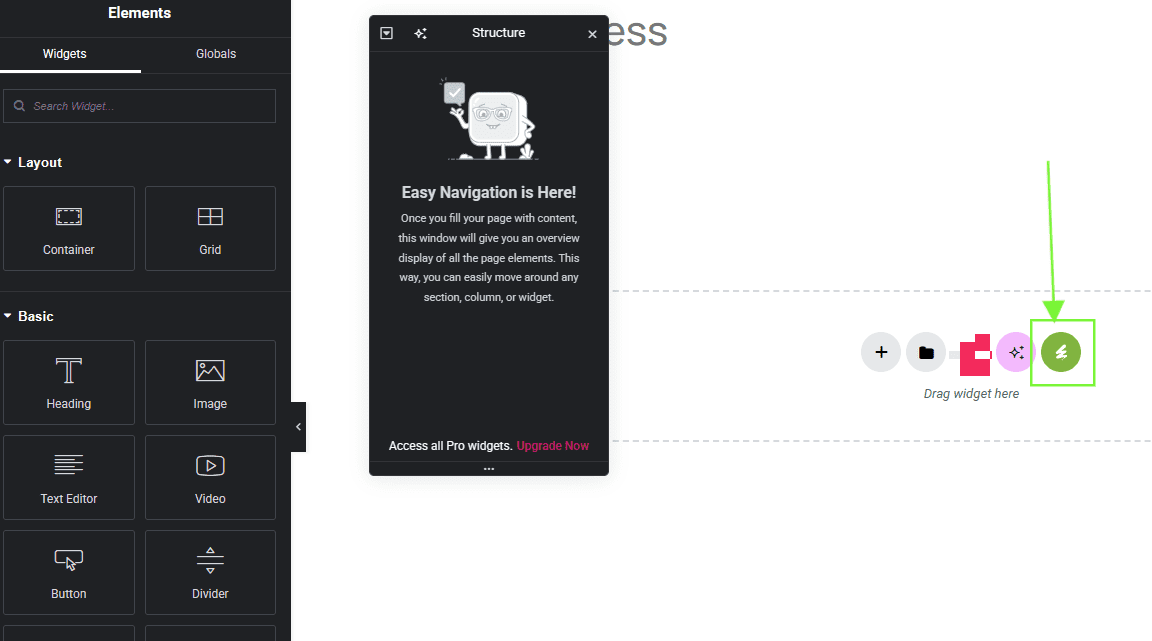
  2. Click the Envato icon in the builder area. On a slow connection you can click the folder icon to open the Elementor Template Library instead.
    Envato icon in the Elementor builder
    Elementor Template Library panel
  3. Click View Installed Kit, choose a template of type Page or Container and click Insert Template.
  4. If Elementor asks “Apply the settings of the page too?”, click Do not Apply.
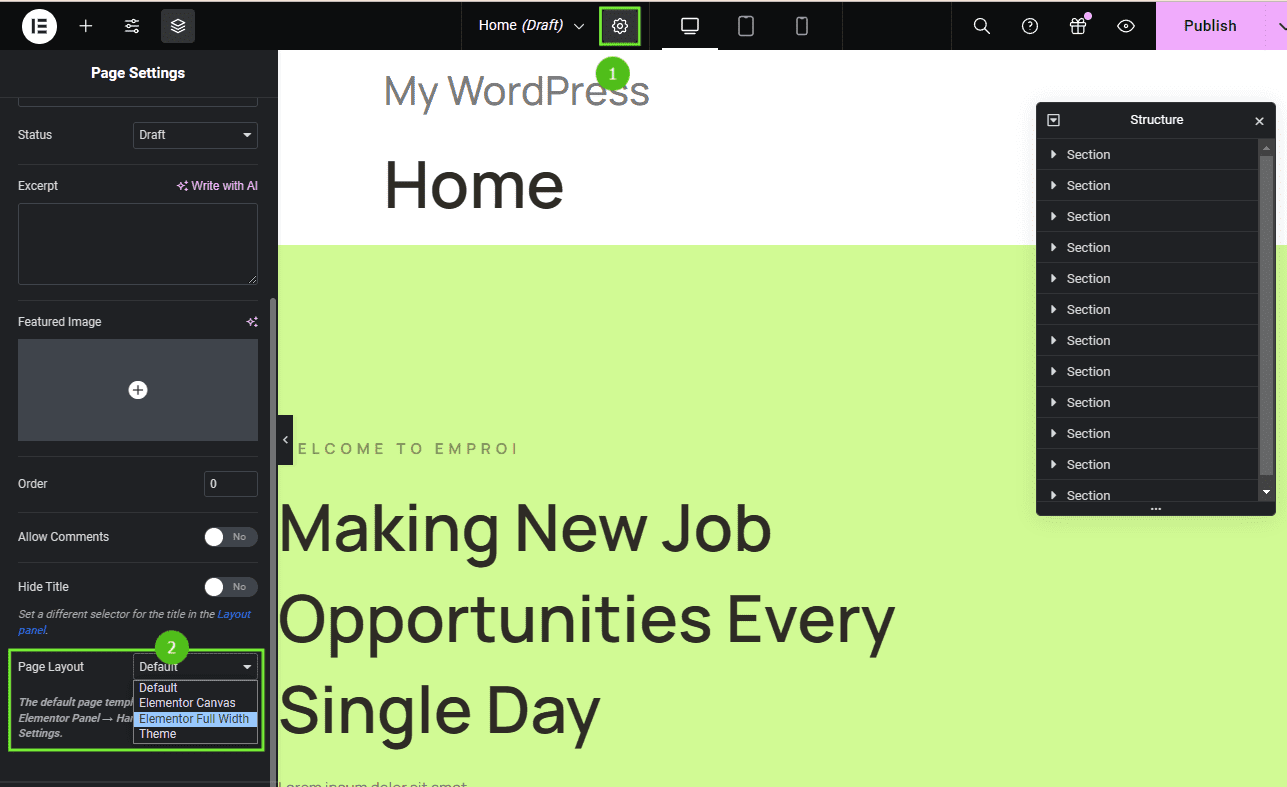
  5. Click the gear icon in the Elementor panel to open Page Settings.
  6. Set Page Layout to Elementor Full Width. This keeps your global header and footer working and removes the default page title.
    Page Settings with Elementor Full Width layout
  7. Click Publish (or Update) when you are done.
i
Tip

If the kit has an alternate header for a special layout, use Elementor Canvas instead to hide the global header on that page.

Good to know

  • No “Page” label on a template? No problem, other template types are customized with the Elementor Pro Theme Builder.
  • The button says Import Template instead of Insert Template? Go back to Tools → Template Kit and import the kit first.

Forms, Slides & Tabs

Some kits include content-block templates: forms, tabs, slides or Pro loop items. They are used inside content widgets. When you customize a widget, select the matching block in the widget settings.

Each kit can be different, so check the item page of your kit for the exact usage. For Pro loop items, see Elementor’s guide to Loop Grids.

i
Note

Forms need a working form plugin or Elementor Pro Forms. Set your own email address in the form actions, otherwise messages go to the demo address.

Header, Footer & Homepage

Navigation menu

Create your menu in Appearance → Menus and assign it to the menu location or widget used by the header.

Header and footer

  • Kits that need Elementor Pro set up the header and footer automatically in Templates → Theme Builder. If you do not see them, check that Page Layout is Elementor Full Width and that the Header template condition is Entire Site.
  • Kits without Elementor Pro use another setup method. Check the item page of your kit for the instructions.

Set your homepage

Go to Settings → Reading, select A static page and choose the page you built as Homepage. Click Save Changes.

Support & Credits

If you have any question, email us at [email protected] and we will reply as soon as possible. When you report an import error, click Show Debug Details and send us the log, the name of your kit and your site URL. For help with Elementor itself, go to Elementor → Get Help in your WordPress admin.

Still need help?

Thank you for choosing Vithemes. If something in this guide is unclear, or need help with the demo import, our team is happy to help. Send us an email and we will reply as soon as possible.

© Themesflat · Sold on Vithemes. All demo images are for preview purposes only.